
Access
Install
brew install --cask wezterm vs Warp
 vs Ghostty
 vs iTerm2
 vs Alacritty
 vs kitty
Showcase
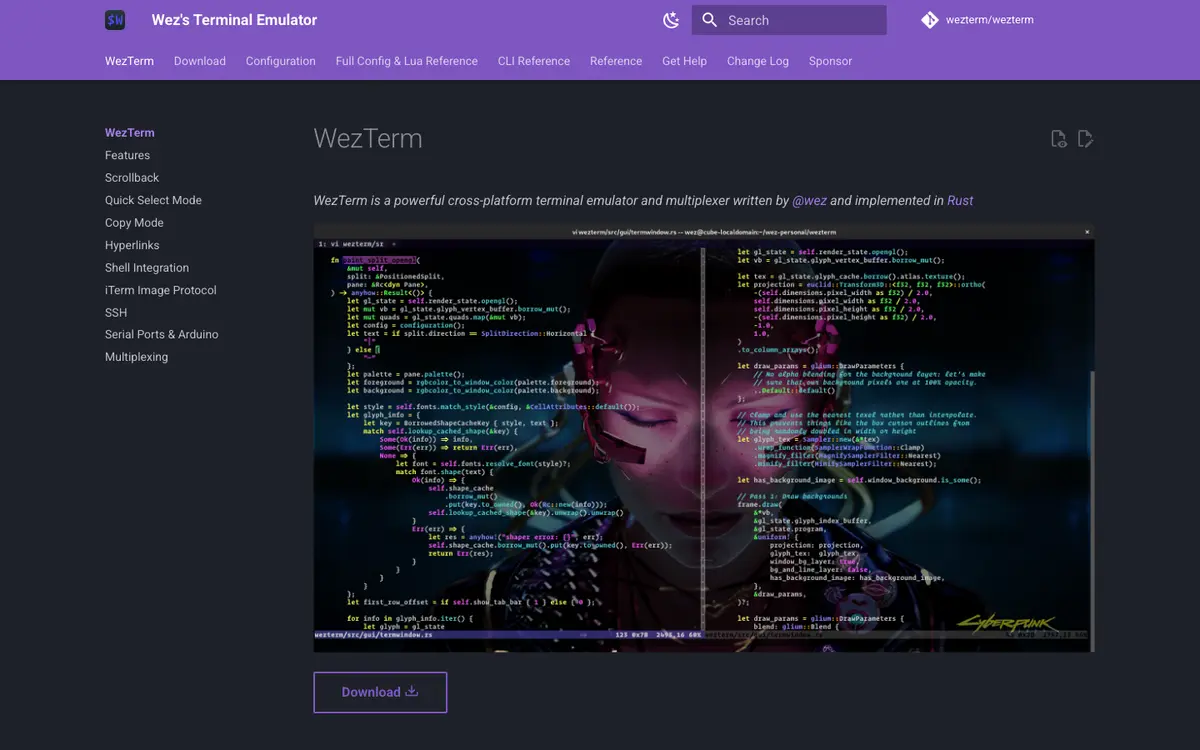
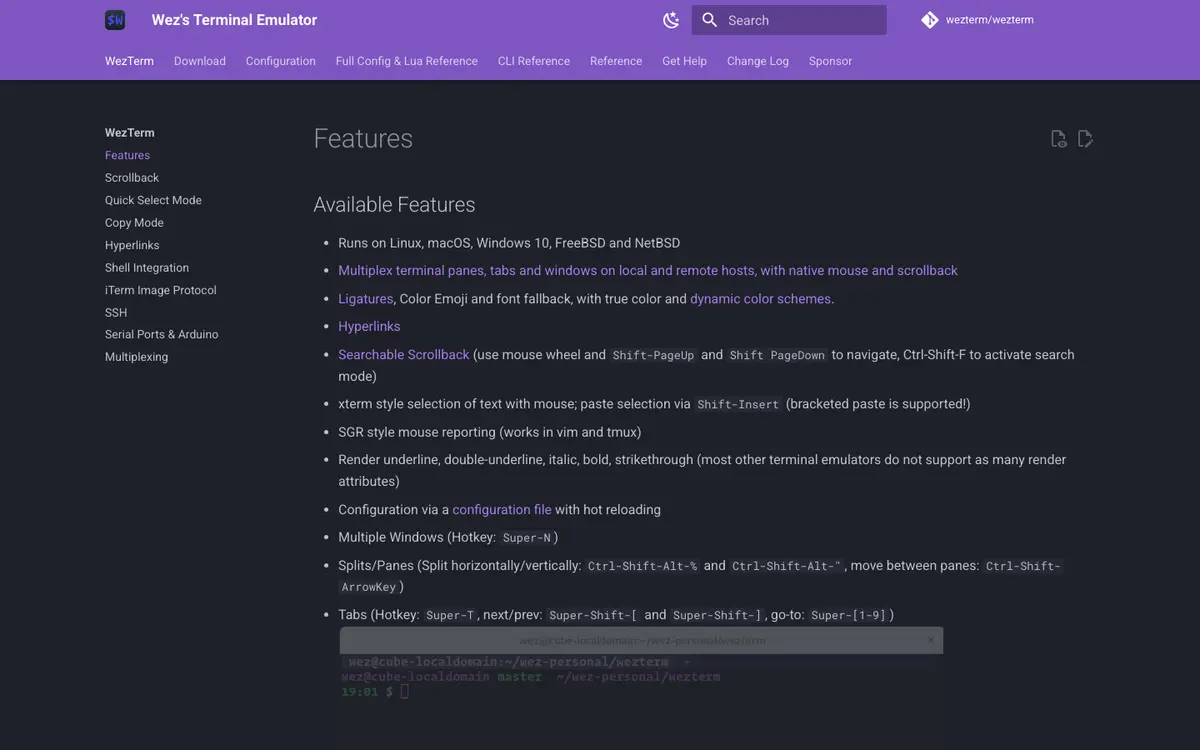
Try itExperimental
See what an agent can do with WezTerm before you ever sign up. Pick a story: recorded sessions replay real probe-harness transcripts; sandboxed self-drive sessions are designed and gated (docs/TRY-IT.md).
$wezterm cli --helprecorded session — replayed, not liveVerified integrations
No integration evidence found in our corpus for this product yet — that means none was found, never that it doesn’t integrate.
By theme — the product's score on each story themeBy theme
Agenticness — how well agents can access and operate the productAgenticnessevidence →
How well agents can access and operate the product
Ai assistance — stories about ai assistance in this arenaAi assistanceevidence →
Stories about ai assistance in this arena
Automation depth — how much of the product can run unattendedAutomation depthevidence →
How much of the product can run unattended
Config theming — stories about config theming in this arenaConfig themingevidence →
Stories about config theming in this arena
Openness — open source, data portability, and self-hosting storiesOpennessevidence →
Open source, data portability, and self-hosting stories
Panes multiplexing — stories about panes multiplexing in this arenaPanes multiplexingevidence →
Stories about panes multiplexing in this arena
Performance rendering — stories about performance rendering in this arenaPerformance renderingevidence →
Stories about performance rendering in this arena
Privacy posture — data-handling and privacy storiesPrivacy postureevidence →
Data-handling and privacy stories
Protocols media — stories about protocols media in this arenaProtocols mediaevidence →
Stories about protocols media in this arena
Remote ssh — stories about remote ssh in this arenaRemote sshevidence →
Stories about remote ssh in this arena
Scriptability control — stories about scriptability control in this arenaScriptability controlevidence →
Stories about scriptability control in this arena
Shell integration — stories about shell integration in this arenaShell integrationevidence →
Stories about shell integration in this arena
Workflow ergonomics — stories about workflow ergonomics in this arenaWorkflow ergonomicsevidence →
Stories about workflow ergonomics in this arena
Story verdicts — every judged story with its evidenceStory verdicts
Follow the green: where the map greys out is where WezTerm stops today. ✓ full · ~ partial · ! disputed · — none · n/a not applicable.
Agenticness — how well agents can access and operate the productAgenticness
How well agents can access and operate the product
API surface
Drive the product through a documented public API
~6/10
unlocks → Webhooks · MCP server · Machine-readable spec · Versioning policy · I get command-aware features from shell integration, like exit status, duration, and notifications when long commands finish · Jump between prompts and command marks in my scrollback thanks to shell integration
Subscribe to events via webhooks
—–
Build against official SDKs
n/an/a
Issue scoped/least-privilege API credentials for an agent
n/an/a
Connect an agent via an official MCP server
—–
Download a machine-readable API spec (OpenAPI or equivalent)
—0/10
Rely on versioned APIs with a documented deprecation policy
—0/10
Test against a sandbox environment without touching production data
n/an/a
Explore an interactive API reference with runnable examples
—0/10
Docs for agents
Point an agent at llms.txt or agent-oriented docs
—0/10
Agentic features
Delegate tasks to a built-in AI assistant inside the product
n/an/a
Operate the product with natural-language commands
n/an/a
Plug MCP servers into this product so it can use their tools
—–
Get AI-generated insights and suggestions from my data inside the product
n/an/a
Set up automations that run autonomously in the background
—0/10
Ai assistance — stories about ai assistance in this arenaAi assistance
Stories about ai assistance in this arena
Automation depth — how much of the product can run unattendedAutomation depth
How much of the product can run unattended
Automation depth
Define rules that trigger actions automatically on events
~3/10
unlocks → Versioned workflows · Autonomous automations · Discover and run terminal actions from a searchable command palette
Schedule recurring jobs or workflows
—–
Perform bulk operations across many items at once
~4/10
Version, review, and roll back my automations
—–
Config theming — stories about config theming in this arenaConfig theming
Stories about config theming in this arena
Openness — open source, data portability, and self-hosting storiesOpenness
Open source, data portability, and self-hosting stories
Panes multiplexing — stories about panes multiplexing in this arenaPanes multiplexing
Stories about panes multiplexing in this arena
Performance rendering — stories about performance rendering in this arenaPerformance rendering
Stories about performance rendering in this arena
Privacy posture — data-handling and privacy storiesPrivacy posture
Data-handling and privacy stories
Protocols media — stories about protocols media in this arenaProtocols media
Stories about protocols media in this arena
Remote ssh — stories about remote ssh in this arenaRemote ssh
Stories about remote ssh in this arena
Scriptability control — stories about scriptability control in this arenaScriptability control
Stories about scriptability control in this arena
Let a coding agent programmatically drive the terminal itself — create panes, run commands, read output — through a documented control protocol or API
✓9/10
Extend the terminal with scripts or plugins in a real language (Lua, Python, kittens) beyond built-in options
~6/10
Define startup sessions and window layouts in config or scripts so a project workspace opens in one command
✓7/10
Script and control the terminal from the command line — open windows, send text, query state — via a documented CLI or IPC interface
✓9/10
Shell integration — stories about shell integration in this arenaShell integration
Stories about shell integration in this arena
Workflow ergonomics — stories about workflow ergonomics in this arenaWorkflow ergonomics
Stories about workflow ergonomics in this arena
Sorted by importance (agentic first) (high → low) · 54/54 stories · click a row’s chevron for the rationale and evidence
Drive the product through a documented public API G Agent access | ai-native user | Agenticness — how well agents can access and operate the productAgenticness | 3 | partial | 6/10 | Tprobed | |
Connect an agent via an official MCP server G Agent access | ai-native user | Agenticness — how well agents can access and operate the productAgenticness | 3 | none | untested | none yet | |
Delegate tasks to a built-in AI assistant inside the product G Agentic features | ai-native user | Agenticness — how well agents can access and operate the productAgenticness | 3 | n/a | untested | none yet | |
Plug MCP servers into this product so it can use their tools G Agent access | ai-native user | Agenticness — how well agents can access and operate the productAgenticness | 3 | none | untested | none yet | |
Run the product headlessly / in CI for automation G Agent access | ai-native user | Agenticness — how well agents can access and operate the productAgenticness | 2 | full | 8/10 | Tprobed | |
Use an official CLI G Agent access | ai-native user | Agenticness — how well agents can access and operate the productAgenticness | 2 | full | 8/10 | Tprobed | |
Download a machine-readable API spec (OpenAPI or equivalent) G Api quality | ai-native user | Agenticness — how well agents can access and operate the productAgenticness | 2 | none | 0/10 | ||
Explore an interactive API reference with runnable examples G Api quality | ai-native user | Agenticness — how well agents can access and operate the productAgenticness | 2 | none | 0/10 | ||
Point an agent at llms.txt or agent-oriented docs G Agent access | ai-native user | Agenticness — how well agents can access and operate the productAgenticness | 2 | none | 0/10 | ||
Rely on versioned APIs with a documented deprecation policy G Api quality | ai-native user | Agenticness — how well agents can access and operate the productAgenticness | 2 | none | 0/10 | ||
Set up automations that run autonomously in the background G Agentic features | ai-native user | Agenticness — how well agents can access and operate the productAgenticness | 2 | none | 0/10 | ||
Build against official SDKs G Agent access | ai-native user | Agenticness — how well agents can access and operate the productAgenticness | 2 | n/a | untested | none yet | |
Get AI-generated insights and suggestions from my data inside the product G Agentic features | ai-native user | Agenticness — how well agents can access and operate the productAgenticness | 2 | n/a | untested | none yet | |
Issue scoped/least-privilege API credentials for an agent G Agent access | ai-native user | Agenticness — how well agents can access and operate the productAgenticness | 2 | n/a | untested | none yet | |
Operate the product with natural-language commands G Agentic features | ai-native user | Agenticness — how well agents can access and operate the productAgenticness | 2 | n/a | untested | none yet | |
Subscribe to events via webhooks G Agent access | ai-native user | Agenticness — how well agents can access and operate the productAgenticness | 2 | none | untested | none yet | |
Test against a sandbox environment without touching production data G Api quality | ai-native user | Agenticness — how well agents can access and operate the productAgenticness | 1 | n/a | untested | none yet | |
Keep the terminal's full configuration as plain-text files in my dotfiles and sync it across machines C Dotfiles | power-user | Config theming — stories about config theming in this arenaConfig theming | 3 | full | 9/10 | Xcommunity | |
Let a coding agent programmatically drive the terminal itself — create panes, run commands, read output — through a documented control protocol or API C Agent control | ai-native user | Scriptability control — stories about scriptability control in this arenaScriptability control | 3 | full | 9/10 | Tprobed | |
Script and control the terminal from the command line — open windows, send text, query state — via a documented CLI or IPC interface C Remote control | developer | Scriptability control — stories about scriptability control in this arenaScriptability control | 3 | full | 9/10 | Tprobed | |
Split windows into panes and organize work across tabs without an external multiplexer C Multiplexing | developer | Panes multiplexing — stories about panes multiplexing in this arenaPanes multiplexing | 3 | full | 9/10 | Tprobed | |
Self-host the core product G | ai-native user | Openness — open source, data portability, and self-hosting storiesOpenness | 3 | full | 8/10 | Tprobed | |
Export all of my data in open formats and leave G | ai-native user | Openness — open source, data portability, and self-hosting storiesOpenness | 3 | partial | 5/10 | Xcommunity | |
Rely on GPU-accelerated rendering that stays fast and responsive under heavy output C Rendering | developer | Performance rendering — stories about performance rendering in this arenaPerformance rendering | 3 | disputed | 4/10 | Dcontradicted | |
Define rules that trigger actions automatically on events G | ai-native user | Automation depth — how much of the product can run unattendedAutomation depth | 3 | partial | 3/10 | Tprobed | |
Delegate terminal tasks to a built-in AI agent that plans and executes commands with my approval C Ai agent | ai-native user | Ai assistance — stories about ai assistance in this arenaAi assistance | 3 | none | untested | none yet | |
Prevent my data from being used to train AI models G | ai-native user | Privacy posture — data-handling and privacy storiesPrivacy posture | 3 | n/a | untested | none yet | |
Run the same terminal with the same config on macOS, Linux, and Windows C Platforms | developer | Protocols media — stories about protocols media in this arenaProtocols media | 2 | full | 8/10 | Xcommunity | |
Search my scrollback quickly and jump between matches C Scrollback | developer | Workflow ergonomics — stories about workflow ergonomics in this arenaWorkflow ergonomics | 2 | full | 8/10 | Xcommunity | |
Define startup sessions and window layouts in config or scripts so a project workspace opens in one command C Layouts | power-user | Scriptability control — stories about scriptability control in this arenaScriptability control | 2 | full | 7/10 | Tprobed | |
Display inline images and rich graphics via a documented terminal graphics protocol C Graphics | developer | Protocols media — stories about protocols media in this arenaProtocols media | 2 | disputed | 6/10 | Dcontradicted | |
Do everything through the API that I can do in the UI G | ai-native user | Openness — open source, data portability, and self-hosting storiesOpenness | 2 | partial | 6/10 | Tprobed | |
Extend the terminal with scripts or plugins in a real language (Lua, Python, kittens) beyond built-in options C Extensibility | developer | Scriptability control — stories about scriptability control in this arenaScriptability control | 2 | partial | 6/10 | Xcommunity | |
SSH to remote hosts with the terminal's own integration carrying my terminfo, shell integration, and config along C Ssh | developer | Remote ssh — stories about remote ssh in this arenaRemote ssh | 2 | partial | 6/10 | Cclaimed | |
Use programming fonts with ligatures, fallback fonts, and fine-grained font tuning C Fonts | developer | Config theming — stories about config theming in this arenaConfig theming | 2 | disputed | 6/10 | Dcontradicted | |
Use tmux inside the terminal, or a documented native tmux integration/control mode C Tmux | developer | Remote ssh — stories about remote ssh in this arenaRemote ssh | 2 | partial | 6/10 | Tprobed | |
Apply color schemes and themes, including automatic light/dark mode switching C Theming | power-user | Config theming — stories about config theming in this arenaConfig theming | 2 | partial | 4/10 | Cclaimed | |
Open URLs and file paths from output by clicking them or selecting them from the keyboard C Hyperlinks | developer | Workflow ergonomics — stories about workflow ergonomics in this arenaWorkflow ergonomics | 2 | partial | 4/10 | Cclaimed | |
Perform bulk operations across many items at once G | ai-native user | Automation depth — how much of the product can run unattendedAutomation depth | 2 | partial | 4/10 | Tprobed | |
Restore my windows, tabs, and working directories after a restart or crash C Sessions | developer | Panes multiplexing — stories about panes multiplexing in this arenaPanes multiplexing | 2 | partial | 3/10 | Cclaimed | |
I get command-aware features from shell integration, like exit status, duration, and notifications when long commands finish C Command tracking | developer | Shell integration — stories about shell integration in this arenaShell integration | 2 | none | 0/10 | ||
Jump between prompts and command marks in my scrollback thanks to shell integration C Marks | developer | Shell integration — stories about shell integration in this arenaShell integration | 2 | none | 0/10 | ||
Choose where my data is stored (region/residency) G | ai-native user | Privacy posture — data-handling and privacy storiesPrivacy posture | 2 | n/a | untested | none yet | |
Control data retention and deletion G | ai-native user | Privacy posture — data-handling and privacy storiesPrivacy posture | 2 | n/a | untested | none yet | |
Get AI explanations and suggested fixes when a command fails C Ai commands | ai-native user | Ai assistance — stories about ai assistance in this arenaAi assistance | 2 | n/a | untested | none yet | |
Opt out of telemetry and usage tracking G | ai-native user | Privacy posture — data-handling and privacy storiesPrivacy posture | 2 | none | untested | none yet | |
Read the product's source under an open license G | ai-native user | Openness — open source, data portability, and self-hosting storiesOpenness | 2 | none | untested | none yet | |
Schedule recurring jobs or workflows G | ai-native user | Automation depth — how much of the product can run unattendedAutomation depth | 2 | none | untested | none yet | |
See published benchmarks or measured latency/throughput numbers backing the terminal's performance claims C Benchmarks | power-user | Performance rendering — stories about performance rendering in this arenaPerformance rendering | 2 | none | untested | none yet | |
Type natural language and get the right shell command generated in place C Ai commands | ai-native user | Ai assistance — stories about ai assistance in this arenaAi assistance | 2 | n/a | untested | none yet | |
Use or fully disable AI features with clear control over what session data leaves my machine, without a forced login C Ai privacy | ai-native user | Ai assistance — stories about ai assistance in this arenaAi assistance | 2 | none | untested | none yet | |
Discover and run terminal actions from a searchable command palette C Discoverability | power-user | Workflow ergonomics — stories about workflow ergonomics in this arenaWorkflow ergonomics | 1 | none | 0/10 | ||
Summon the terminal instantly with a global hotkey or quake-style dropdown window C Quick access | power-user | Panes multiplexing — stories about panes multiplexing in this arenaPanes multiplexing | 1 | none | untested | none yet | |
Version, review, and roll back my automations G | ai-native user | Automation depth — how much of the product can run unattendedAutomation depth | 1 | none | untested | none yet |
Opportunities — the stories that would move this product's scores, from its own judged verdictsOpportunitiestop 8 of 30 stories with headroom
What would move WezTerm’s scores — derived from its own judged verdicts, biggest headroom first. Each line quotes what the judge found missing; shipping it (or evidencing it publicly) is the fix.
Agenticness — how well agents can access and operate the productPlug MCP servers into this product so it can use their tools
nonemoves agent-readyimpact 45
The axis applies to terminal emulators as a kind (peer products hold positive or none verdicts on this story), so lack of evidence for an applicable capability is "none", never "na".
Agenticness — how well agents can access and operate the productConnect an agent via an official MCP server
nonemoves agent-readyimpact 45
This product is not itself an agent, so publishing an official MCP server is plausible and the axis applies; no first-party MCP server appears in the evidence.
Ai assistance — stories about ai assistance in this arenaDelegate terminal tasks to a built-in AI agent that plans and executes commands with my approval
nonemoves PA Scoreimpact 30
The axis applies to terminal emulators as a kind (peer products hold positive or none verdicts on this story), so lack of evidence for an applicable capability is "none", never "na".
Agenticness — how well agents can access and operate the productPoint an agent at llms.txt or agent-oriented docs
nonemoves agent-readyimpact 30
WezTerm is a terminal emulator with no llms.txt or agent-oriented documentation endpoint; probes explicitly confirm 404s for llms.txt and markdown doc variants, and there is no mention of agent-facing docs anywhere in the docs or community evidence.
Agenticness — how well agents can access and operate the productSet up automations that run autonomously in the background
nonemoves Built-in AIimpact 30
Missing: any documented scheduling/trigger mechanism, autonomous background job execution, or agent-loop capability distinct from manual/CLI-invoked scripting.
Agenticness — how well agents can access and operate the productSubscribe to events via webhooks
nonemoves agent-readyimpact 30
The axis applies to terminal emulators as a kind (peer products hold positive or none verdicts on this story), so lack of evidence for an applicable capability is "none", never "na".
Agenticness — how well agents can access and operate the productExplore an interactive API reference with runnable examples
nonemoves API qualityimpact 30
WezTerm is a terminal emulator with static configuration docs and a Lua API reference, but there's no evidence of an interactive, runnable-examples API reference; probes confirm no llms.txt, no docs-md, and no OpenAPI/interactive API surface exists.
Agenticness — how well agents can access and operate the productDownload a machine-readable API spec (OpenAPI or equivalent)
nonemoves API qualityimpact 30
WezTerm exposes a CLI and mux protocol but no machine-readable API spec is documented; probes for llms.txt, docs-md, and OpenAPI/swagger endpoints all return 404.
Showing the top 8 of 30 — every none/partial verdict in the story verdicts table is headroom.
Think a verdict is wrong? Every verdicts-table row has a Flag link — see the methodology.
Coverage map — which docs area, API section, or community source covers which judged storiesCoverage map12 surfaces · 24 covered stories
Where the cited evidence behind each covered verdict came from — the same citations the verdicts table shows, no extra judging.
CLI docs13 stories
- Run the product headlessly / in CI for automation
- Use an official CLI
- Drive the product through a documented public API
- Perform bulk operations across many items at once
- Define rules that trigger actions automatically on events
- Do everything through the API that I can do in the UI
- Self-host the core product
- Split windows into panes and organize work across tabs without an external multiplexer
- Display inline images and rich graphics via a documented terminal graphics protocol
- Use tmux inside the terminal, or a documented native tmux integration/control mode
- Let a coding agent programmatically drive the terminal itself — create panes, run commands, read output — through a documented control protocol or API
- Define startup sessions and window layouts in config or scripts so a project workspace opens in one command
- Script and control the terminal from the command line — open windows, send text, query state — via a documented CLI or IPC interface
Hacker News12 stories
- Keep the terminal's full configuration as plain-text files in my dotfiles and sync it across machines
- Use programming fonts with ligatures, fallback fonts, and fine-grained font tuning
- Export all of my data in open formats and leave
- Split windows into panes and organize work across tabs without an external multiplexer
- Rely on GPU-accelerated rendering that stays fast and responsive under heavy output
- Display inline images and rich graphics via a documented terminal graphics protocol
- Run the same terminal with the same config on macOS, Linux, and Windows
- Use tmux inside the terminal, or a documented native tmux integration/control mode
- Let a coding agent programmatically drive the terminal itself — create panes, run commands, read output — through a documented control protocol or API
- Extend the terminal with scripts or plugins in a real language (Lua, Python, kittens) beyond built-in options
- Script and control the terminal from the command line — open windows, send text, query state — via a documented CLI or IPC interface
- Search my scrollback quickly and jump between matches
Config docs8 stories
- Define rules that trigger actions automatically on events
- Keep the terminal's full configuration as plain-text files in my dotfiles and sync it across machines
- Use programming fonts with ligatures, fallback fonts, and fine-grained font tuning
- Apply color schemes and themes, including automatic light/dark mode switching
- Export all of my data in open formats and leave
- Run the same terminal with the same config on macOS, Linux, and Windows
- Extend the terminal with scripts or plugins in a real language (Lua, Python, kittens) beyond built-in options
- Define startup sessions and window layouts in config or scripts so a project workspace opens in one command
Features docs5 stories
- Split windows into panes and organize work across tabs without an external multiplexer
- Display inline images and rich graphics via a documented terminal graphics protocol
- Use tmux inside the terminal, or a documented native tmux integration/control mode
- Open URLs and file paths from output by clicking them or selecting them from the keyboard
- Search my scrollback quickly and jump between matches
Multiplexing docs4 stories
Shell integration docs4 stories
- Define rules that trigger actions automatically on events
- Restore my windows, tabs, and working directories after a restart or crash
- SSH to remote hosts with the terminal's own integration carrying my terminfo, shell integration, and config along
- Extend the terminal with scripts or plugins in a real language (Lua, Python, kittens) beyond built-in options
Ssh docs3 stories
wezterm.org3 stories
llms.txt2 stories
OpenAPI spec2 stories
Quickselect docs2 stories
Probe proofs — replayable recordings from the probe harnessProbe proofs
Replayable recordings from our probe harness — see the Prove-It protocol to submit one.
$wezterm cli --helpreproduced$ wezterm cli --help
Interact with experimental mux server
Usage: wezterm cli [OPTIONS] <COMMAND>
Commands:
list list windows, tabs and panes
list-clients list clients
proxy start rpc proxy pipe
tlscreds obtain tls credentials
move-pane-to-new-tab Move a pane into a new tab
split-pane split the current pane.
Outputs the pane-id for the newly created pane on success
spawn Spawn a command into a new window or tab
Outputs the pane-id for the newly created pane on success
send-text Send text to a pane as though it were pasted. If bracketed paste mode
is enabled in the pane, then the text will be sent as a bracketed
paste
get-text Retrieves the textual content of a pane and output it to stdout
activate-pane-direction Activate an adjacent pane in the specified direction
get-pane-direction Determine the adjacent pane in the specified direction
kill-pane Kill a pane
activate-pane Activate (focus) a pane
adjust-pane-size Adjust the size of a pane directionally
activate-tab Activate a tab
set-tab-title Change the title of a tab
set-window-title Change the title of a window
rename-workspace Rename a workspace
zoom-pane Zoom, unzoom, or toggle zoom state
help Print this message or the help of the given subcommand(s)
Options:
--no-auto-start Don't automatically start the server
--prefer-mux Prefer connecting to a background mux server. The default is to prefer
connecting to a running wezterm gui instance
--class <CLASS> When connecting to a gui instance, if you started the gui with `--class
SOMETHING`, you should also pass that same value here in order for the client
to find the correct gui instance
-h, --help Print help
$wezterm --versionreproduced$ wezterm --version wezterm 20240203-110809-5046fc22
$wezterm-mux-server --daemonize && PANE=$(wezterm cli spawn --new-window -- /bin/zsh -l) && wezterm cli send-text --pane-id $PANE --no-paste "echo PA_PROBE_OK" && wezterm cli get-text --pane-id $PANE && wezterm cli listreproduced$ wezterm-mux-server --daemonize && PANE=$(wezterm cli spawn --new-window -- /bin/zsh -l) && wezterm cli send-text --pane-id $PANE --no-paste "echo PA_PROBE_OK" && wezterm cli get-text --pane-id $PANE && wezterm cli list
echo PA_PROBE_OK%
judegomila@Judes-MBP ~ % echo PA_PROBE_OK
WINID TABID PANEID WORKSPACE SIZE TITLE CWD
1 1 1 default 80x24 zsh file:///Users/judegomila
0 0 0 default 80x24 zsh file:///Users/judegomila
Claims vs evidence — vendor claims reconciled against independent verdictsClaims vs evidence
4 of 10 testable claims verified · 3 contradicted → integrity 0/100
16 distinct capability claims found in WezTerm’s own claimed-docs/GitHub materials, reconciled against our judge’s independent verdicts.
4
Verified
3
Unverified
3
Contradicted
14
Undersold
Verified (5)
“Multiplexes panes, tabs and windows across local and remote hosts with native mouse support and scrollback”
Split windows into panes and organize work across tabs without an external multiplexerfullproof ↗
“Searchable scrollback with keyboard/mouse navigation and a search mode”
Search my scrollback quickly and jump between matchesfullproof ↗
“Watches config file and automatically reloads settings on change, applying most options immediately”
Keep the terminal's full configuration as plain-text files in my dotfiles and sync it across machinesfullproof ↗
“CLI subcommand can interact with a running wezterm instance to spawn programs and manipulate tabs/panes”
Script and control the terminal from the command line — open windows, send text, query state — via a documented CLI or IPC interfacefullproof ↗
“Configuration values can be overridden via command-line flags”
Keep the terminal's full configuration as plain-text files in my dotfiles and sync it across machinesfullproof ↗
Unverified (6)
“Built-in SSH client with native tabs for remote connections”
SSH to remote hosts with the terminal's own integration carrying my terminfo, shell integration, and config alongpartialproof ↗
“Remote wezterm multiplexer sessions can be reached over an SSH domain, preserving tabs”
SSH to remote hosts with the terminal's own integration carrying my terminfo, shell integration, and config alongpartialproof ↗
“Remote wezterm multiplexer sessions can be reached over an SSH domain, preserving tabs”
Restore my windows, tabs, and working directories after a restart or crashpartialproof ↗
“Embedded SSH library provides an integrated client for ad-hoc SSH connections”
SSH to remote hosts with the terminal's own integration carrying my terminfo, shell integration, and config alongpartialproof ↗
“Supports ligatures, color emoji, font fallback, true color, and dynamic color schemes”
Apply color schemes and themes, including automatic light/dark mode switchingpartialproof ↗
“Lets users change font size and color scheme at runtime”
Apply color schemes and themes, including automatic light/dark mode switchingpartialproof ↗
Contradicted (4)
“Supports ligatures, color emoji, font fallback, true color, and dynamic color schemes”
Use programming fonts with ligatures, fallback fonts, and fine-grained font tuningdisputedproof ↗
“Can output images directly to the terminal”
Display inline images and rich graphics via a documented terminal graphics protocoldisputedproof ↗
“Supports iTerm2-compatible image protocol plus a built-in imgcat command”
Display inline images and rich graphics via a documented terminal graphics protocoldisputedproof ↗
“Shell integration exposes a function to set custom user variables”
I get command-aware features from shell integration, like exit status, duration, and notifications when long commands finishnoneproof ↗
Undersold (14)
Run the product headlessly / in CI for automationfullproof ↗
Drive the product through a documented public APIpartialproof ↗
Perform bulk operations across many items at oncepartialproof ↗
Define rules that trigger actions automatically on eventspartialproof ↗
Do everything through the API that I can do in the UIpartialproof ↗
Export all of my data in open formats and leavepartialproof ↗
Run the same terminal with the same config on macOS, Linux, and Windowsfullproof ↗
Use tmux inside the terminal, or a documented native tmux integration/control modepartialproof ↗
Let a coding agent programmatically drive the terminal itself — create panes, run commands, read output — through a documented control protocol or APIfullproof ↗
Extend the terminal with scripts or plugins in a real language (Lua, Python, kittens) beyond built-in optionspartialproof ↗
Define startup sessions and window layouts in config or scripts so a project workspace opens in one commandfullproof ↗
Open URLs and file paths from output by clicking them or selecting them from the keyboardpartialproof ↗
Claims outside our story set (3)
Real capability claims found in WezTerm’s own materials, but no story in this arena’s taxonomy covers them yet — that’s feedback on the taxonomy, not a mark against the product.
“Can connect to serial ports for embedded/Arduino development”
source ↗“Quick Select mode highlights common text patterns for fast keyboard-driven copy”
source ↗“New tabs inherit the current working directory via OSC 7 so you don't need to manually cd”
source ↗
Business model
Free, MIT-licensed terminal created and maintained by Wez Furlong with community contributors; no paid tiers, donations via GitHub Sponsors.
pricing ↗Score trend
How this product’s scores have moved as evidence and verdicts are re-derived — a point per change, not per day.
Try Experimental
Run it in the microterminal →Recorded agent sessions — and a live MCP handshake where the vendor ships one.
Flag
⚑ Flag a verdictThink a verdict is wrong? Opens a prefilled GitHub issue — or use the ⚑ next to any verdict above.
For agents